Elementor Integration
Our theme is fully compatible with the Elementor Page Builder, allowing you to create stunning, responsive layouts visually — without writing a single line of code. With Elementor, you can design pages, posts, and custom templates quickly and intuitively.
For detailed guidance on using Elementor, please refer to the official Elementor Documentation.
Custom Widgets
We’ve included a collection of exclusive Elementor widgets to enhance your website-building experience.
These widgets are available in the Elementor editor under the Domio category.

Each widget is designed to complement the theme’s visual style and provide flexibility for building key sections like portfolios, testimonials, services, teams, and more.
Elementor Settings
Before you start creating pages with Elementor, make sure that the relevant post types are enabled for Elementor editing.
To configure this:
- Navigate to Dashboard → Elementor → Settings.
- Under the General tab, check the boxes for the post types you want to edit with Elementor (e.g., Posts, Pages, Service, Project, Team).
- Click Save Changes to apply your settings.
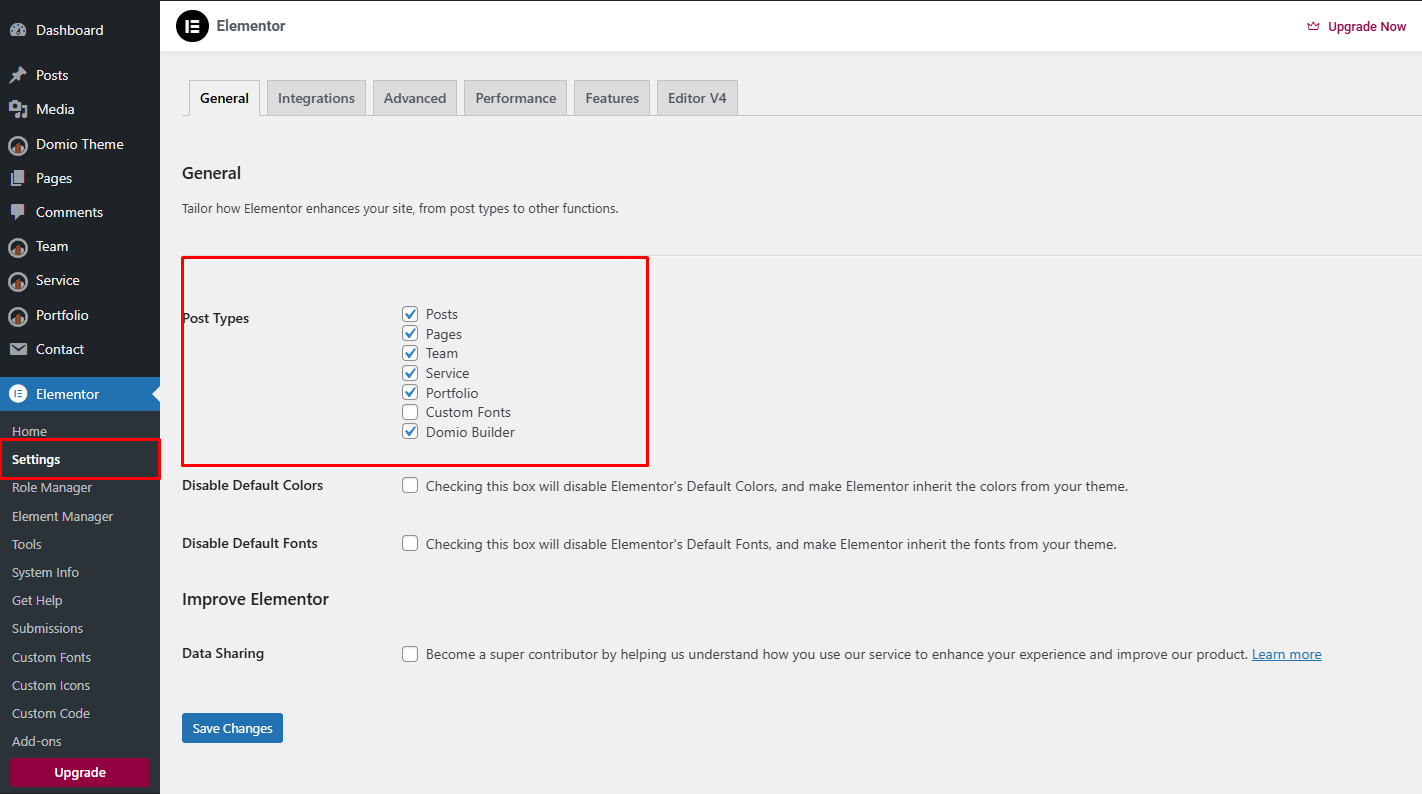
This ensures that Elementor can be used to edit and customize all selected post types seamlessly within your WordPress dashboard.