Home Page Settings
You can define which page appears as your Home Page and which displays your blog posts from the Reading Settings screen.
Accessing the Settings
- Go to Dashboard → Settings → Reading.
- Locate the Your homepage displays section.
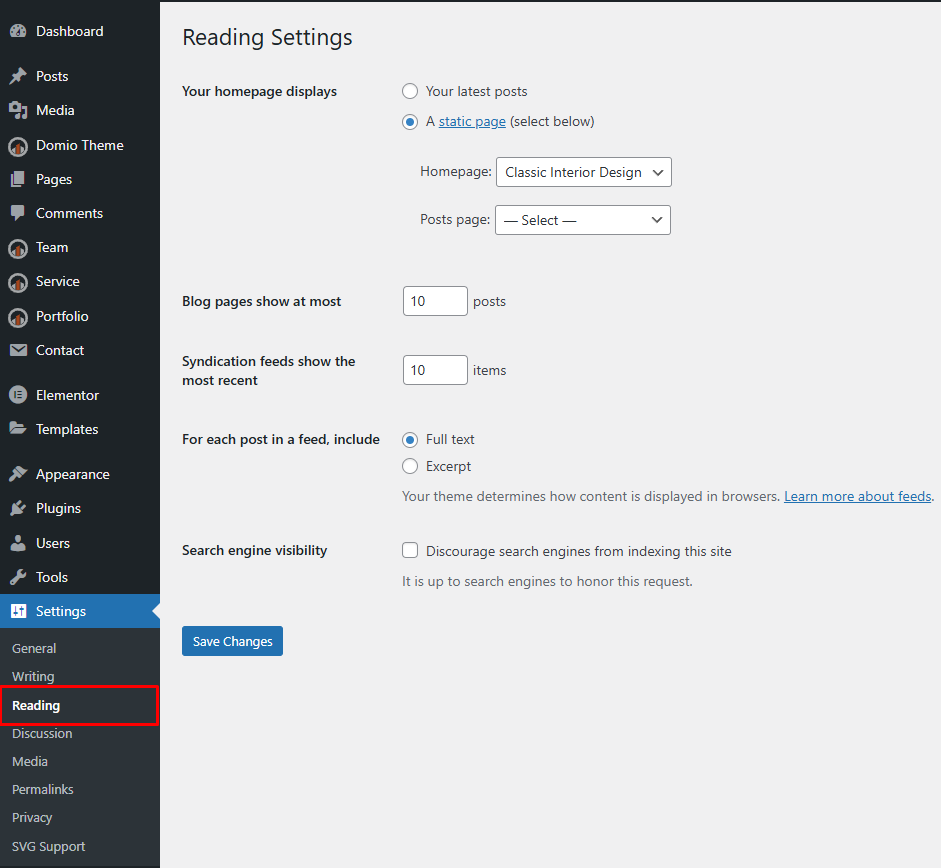
Choosing What to Display
You have two options:
- Your latest posts — Shows your most recent blog posts on the homepage.
- A static page — Lets you select specific pages for your Homepage and Posts page.
Setting a Static Homepage
- Select A static page (select below).
- Choose a page for Homepage (e.g., Home).
- Choose another page for Posts page (e.g., Blog).
- Click Save Changes.
Editing with Elementor
Once your homepage is set:
- Go to Pages → All Pages.
- Edit the selected homepage.
- Click Edit with Elementor to design it using theme widgets.
💡 Tip: For best results, use a static page as your homepage and build it visually with Elementor.